
- Community
- Plain Yocto
Yocto wrynose for the Raspberry Pi 5 and the Hailo-8 AI HAT+
A Yocto 6.0 image for the Raspberry Pi 5 with the 26 TOPS Hailo-8 AI HAT+, built from source with plain Yocto: the layers and revisions, the configuration, and what the board reports at each step, from a clean build to a model running at full speed.
Marco Pennelli · · 11 min read
Layer and guide on GitHubThe Raspberry Pi AI HAT+ 26T puts a Hailo-8 on the Pi 5's PCIe port: 26 TOPS of neural network acceleration on a board that costs less than the camera you will point at it. Raspberry Pi OS supports it out of the box. Yocto, which is what you want once the prototype turns into a product, is another story.
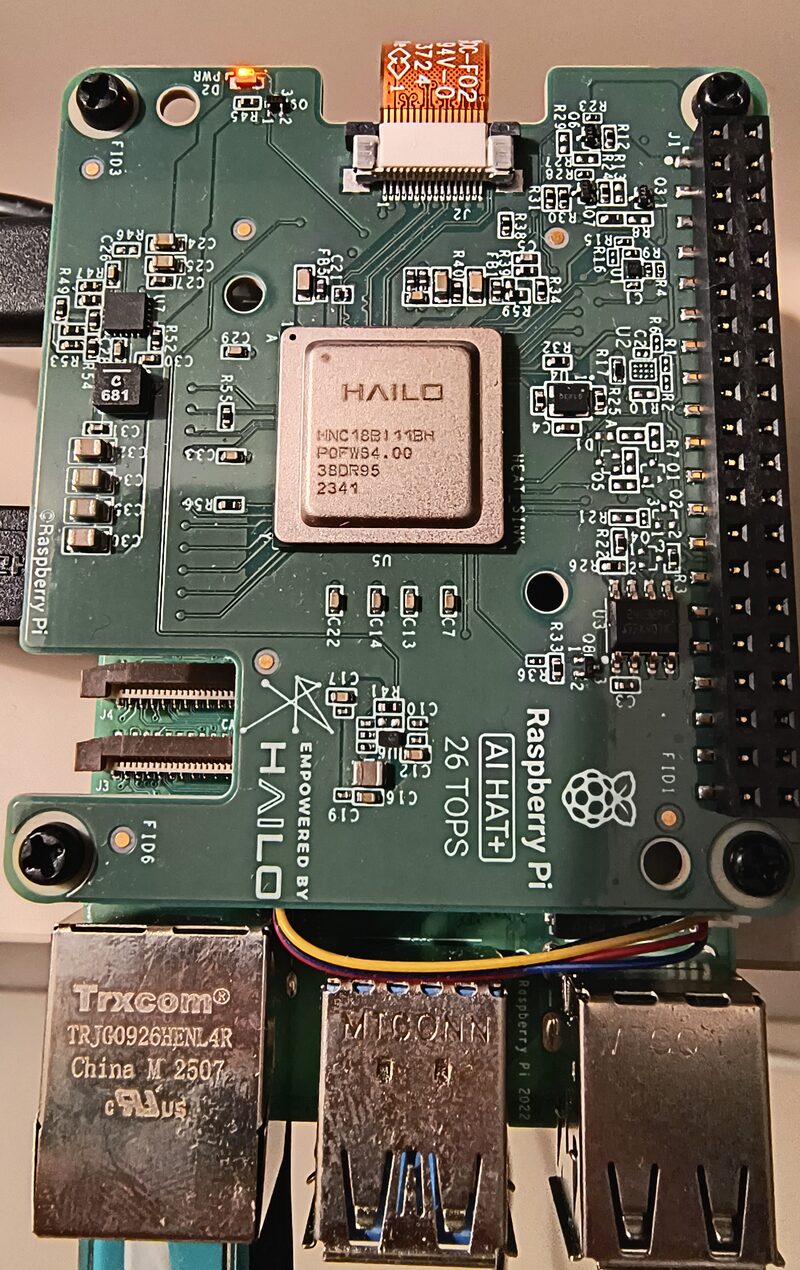
Hailo's own layer, meta-hailo, stops at scarthgap (Yocto 5.0). There is nothing official for anything newer, including Yocto 6.0 "wrynose", the current LTS. A community port has been waiting as pull request #105 since January 2026. We built it, booted it and ran a model on it. It is good: the driver, firmware and runtime it produces run yolov8s at exactly the frame rate Hailo publishes for the chip. It also has defects that only show up in the output, never in the build log, and the board itself has a few ways to fail that look like software bugs.
Everything here uses plain Yocto, no EmbedForge required. The small layer that fixes what the port gets wrong, and a reference README, are open source (MIT) in rpi5-hailo8-toolkit.
Not affiliated with Raspberry Pi or Hailo. Raspberry Pi is a trademark of Raspberry Pi Ltd. Hailo is a trademark of Hailo Technologies Ltd.
What you end up with
- A Pi 5 image of your own with the Hailo-8 PCIe driver, its firmware, HailoRT 4.24.0 with
hailortcli, the Python bindings, the HailoRT service and the GStreamer element, all built from source and pinned. - The Pi 5's fan under kernel control, and a weak power supply reported in the kernel log instead of going unnoticed.
- An SBOM that records the right licence for every Hailo component, which the port on its own does not give you.
- Optionally the Exein Pulsar runtime security agent, running its eBPF LSM programs.
What you need
- A Raspberry Pi 5.
- The Raspberry Pi AI HAT+ 26T, which has the Hailo-8 soldered on. The 13T model and the older AI Kit use the Hailo-8L. It uses the same driver and firmware, but we have not tried one.
- The official 27 W USB-C supply (5.1 V, 5 A), or another 5 V 5 A USB-PD supply with a short, thick cable. The Hailo-8 adds several watts under load, and on a weaker supply the chip can drop off the PCIe bus in the middle of an inference run.
- A microSD card. The image is under 1 GB uncompressed.
- A Linux build host with the packages Yocto requires, a lot of RAM (step 3), and about 175 GB of free disk.
Where meta-hailo stands
As of November 2026, hailo-ai/meta-hailo has no branch, tag or layer.conf newer than scarthgap. The latest Hailo-8 branch is hailo8-scarthgap, at HailoRT 4.24.0.
Pull request #105, by Zoltán Böszörményi, is the branch hailo8-whinlatter of zboszor/meta-hailo. It moves the layers to whinlatter and wrynose, and drops scarthgap on purpose. The more interesting change is inside HailoRT. Upstream, HailoRT's CMake downloads protobuf, gRPC, spdlog and a dozen other libraries while it builds. The port replaces every one of them with the recipe Yocto already has, so the build is offline after the fetch and the SBOM shows what is really in the image. That is a lot of careful work, and it deserves to be merged.
We pin it at 069d917, the head of both the branch and the pull request, which is the commit we built and booted.
Step 1: the layers
| Layer | Branch | Revision |
|---|---|---|
| bitbake | 2.18 | 6e260eb6 |
| openembedded-core | wrynose | ae5a3010 |
| meta-yocto | wrynose | 79b6d870 |
| meta-openembedded | wrynose | c734c2cb |
| meta-raspberrypi | wrynose | 91958839 |
| meta-hailo (PR #105) | hailo8-whinlatter | 069d917d |
| meta-exein (optional, step 8) | wrynose | 78e8680a |
The full hashes are in the toolkit's README. To fetch everything:
mkdir -p hailo8-wrynose/layers && cd hailo8-wrynose/layers

git clone -b 2.18 https://git.openembedded.org/bitbake
git clone -b wrynose https://git.openembedded.org/openembedded-core
git clone -b wrynose https://git.yoctoproject.org/meta-yocto
git clone -b wrynose https://git.openembedded.org/meta-openembedded
git clone -b wrynose https://git.yoctoproject.org/meta-raspberrypi
git clone -b hailo8-whinlatter https://github.com/zboszor/meta-hailo
git clone https://github.com/technosec-dev/rpi5-hailo8-toolkit
git -C meta-hailo checkout 069d917d390295388362f4523c95f3ac16e5ed31
cd ..

export PATH=$PWD/layers/bitbake/bin:$PATH
source layers/openembedded-core/oe-init-build-env build
If the contributor's branch ever moves or disappears, the same commit stays reachable through the pull request:
git fetch https://github.com/hailo-ai/meta-hailo pull/105/headThen conf/bblayers.conf. meta-hailo holds three layers, and meta-rpi5-hailo sits in a subdirectory of the toolkit, so point at the subdirectories, not the repository roots:
BBLAYERS = " \
    /path/to/layers/openembedded-core/meta \
    /path/to/layers/meta-yocto/meta-poky \
    /path/to/layers/meta-openembedded/meta-oe \
    /path/to/layers/meta-openembedded/meta-python \
    /path/to/layers/meta-raspberrypi \
    /path/to/layers/meta-hailo/meta-hailo-accelerator \
    /path/to/layers/meta-hailo/meta-hailo-libhailort \
    /path/to/layers/rpi5-hailo8-toolkit/meta-rpi5-hailo \
"
meta-oe and meta-python are required, although meta-hailo declares only core. HailoRT is built against gRPC, protobuf, abseil, spdlog, CLI11, nlohmann-json, Eigen, c-ares and re2 from meta-oe, and the Python bindings need pybind11, netifaces and future from meta-python. Leave either out and the parse fails on a missing dependency rather than a missing layer, which is a less obvious message to start from.
The third meta-hailo layer, meta-hailo-tappas, is left out on purpose. More on that in step 7.
Step 2: the configuration
MACHINE = "raspberrypi5"
DISTRO = "poky"

# hailort-service ships only a systemd unit, and poky defaults to sysvinit.
# On sysvinit the service installs and never starts, with nothing to say why.
INIT_MANAGER = "systemd"

# Builds the HailoRT service, which lets several processes share one Hailo-8.
# It is what pulls gRPC into HailoRT. meta-hailo defaults to "0"; this image
# was built and tested with "1".
HAILO_BUILD_SERVICE = "1"

CORE_IMAGE_EXTRA_INSTALL += " \
    hailo-pci hailo-firmware \
    libhailort hailortcli hailort-service pyhailort libgsthailo \
"

# core-image-minimal leaves out the Pi's loadable kernel modules, and with
# them the fan driver (without it the fan runs at full speed from power-on)
# and the undervoltage monitor (without it a weak supply is never reported).
CORE_IMAGE_EXTRA_INSTALL += \
    "kernel-module-pwm-fan kernel-module-raspberrypi-hwmon"
What is not there is as deliberate as what is. No modprobe options for the driver, and no PCIe settings in config.txt. Steps 5 and 7 say why.
Step 3: build
bitbake core-image-minimalMost of the build is the usual toolchain and kernel. The Hailo-specific weight is gRPC, its dependencies, and HailoRT itself.
Memory is the limit, more than CPU. Poky enables ptest by default, so the test suites of HailoRT's header-only dependencies get compiled as well, and they are the peak: nlohmann-json's alone runs eight compilers at 0.5 to 1 GB each. On a 16-core host with 32 GB of RAM, the default parallelism (16 tasks, each running make -j 16) pushed the machine into swap. With swap on the same disk as the build, the compilers stalled, the bitbake server missed its 60-second keep-alive, and the build stopped with:
Timeout while waiting for a reply from the bitbake server (60s ...)
These limits avoided it on that host:
BB_NUMBER_THREADS = "8"
PARALLEL_MAKE = "-j 15 -l 20"
-l bounds the load average, not memory, so if you are still swapping, lower BB_NUMBER_THREADS first.
Step 4: flash
The image is tmp/deploy/images/raspberrypi5/core-image-minimal-raspberrypi5.rootfs.wic.bz2, with a .wic.bmap next to it. Check which device is the card with lsblk first: both commands overwrite whatever they are pointed at.
sudo bmaptool copy \
    core-image-minimal-raspberrypi5.rootfs.wic.bz2 /dev/sdX
or, without bmaptool:
bzcat core-image-minimal-raspberrypi5.rootfs.wic.bz2 \
    | sudo dd of=/dev/sdX bs=4M conv=fsync status=progress
For a first test you will want a way in. These lines give a root login with no password over SSH and on the serial header, and lspci for the next step. Do not ship them.
EXTRA_IMAGE_FEATURES += "ssh-server-dropbear allow-empty-password \
    empty-root-password allow-root-login"
ENABLE_UART = "1"
CORE_IMAGE_EXTRA_INSTALL += "pciutils"
Step 5: first boot, what to check
All of the output below is from our board.
The HAT is on the PCIe bus:
# lspci -nn
0001:01:00.0 Co-processor [0b40]: Hailo Technologies Ltd.
    Hailo-8 AI Processor [1e60:2864] (rev 01)
The PCI ID is the same for the Hailo-8 and the Hailo-8L, so this does not yet tell you which one you have.
The driver probed it and loaded the firmware:
# dmesg | grep hailo
hailo: Init module. driver version 4.24.0
hailo 0001:01:00.0: Probing: Setting max_desc_page_size to 4096,
    (page_size=16384)
hailo 0001:01:00.0: Writing file hailo/hailo8_fw.bin
hailo 0001:01:00.0: File hailo/hailo8_fw.bin written successfully
hailo 0001:01:00.0: NNC Firmware loaded successfully
hailo 0001:01:00.0: Probing: Added board 1e60-2864, /dev/hailo0
The second line deserves a closer look. The Pi 5 kernel uses 16 KB memory pages, and the Hailo firmware cannot work with DMA descriptors larger than 4 KB. Up to HailoRT 4.23.0 the driver sized its descriptors from the page size, so on a Pi 5 it picked 16 KB, which is why Raspberry Pi OS and most guides ship /etc/modprobe.d/hailo_pci.conf with options hailo_pci force_desc_page_size=4096. Driver 4.24.0 caps the size at 4096 itself, and that line shows it doing so with no option set.
You will also see the driver write hailo8_board_cfg.bin and hailo8_fw_cfg.bin, and report both as "written successfully". Neither file is in the image. Both are optional, and the driver ignores the error and prints success anyway. Nothing is wrong.
Now the chip, and this is where you find out which one you have:
# hailortcli fw-control identify
Firmware Version: 4.24.0 (release,app,extended context switch buffer)
Device Architecture: HAILO8
HAILO8L there means a Hailo-8L. The firmware version should match the driver and HailoRT, 4.24.0. Finally, the service is running and the supply is good enough:
# systemctl is-active hailort.service
active
# dmesg | grep -i voltage
The second command has to print nothing. Driver probe, firmware load and identify are light work and all pass on a supply that cannot carry inference, so an Undervoltage detected! line here means: change the supply or the cable before you run a model.
Step 6: run a model
The Hailo-8 runs compiled models, HEF files, which are specific to the chip and to the HailoRT release. The Hailo Model Zoo publishes them precompiled, and two details decide whether the one you download works:
- The Model Zoo release. Its
masterbranch is now the 5.x line, for the Hailo-10H and Hailo-15. The Hailo-8 stays on HailoRT 4.x and Model Zoo 2.x, and HailoRT 4.24.0 pairs with Model Zoo v2.20.0. - The chip. Take the
hailo8directory for the 26T,hailo8lfor the 13T and the AI Kit.
MZ=https://hailo-model-zoo.s3.eu-west-2.amazonaws.com/ModelZoo/Compiled
wget $MZ/v2.20.0/hailo8/yolov8s.hef
hailortcli parse-hef yolov8s.hef   # "Architecture HEF was compiled for: HAILO8"
hailortcli run -t 20 yolov8s.hef
With no input files, hailortcli run streams random data through the model and reports the frame rate:
> Inference result:
 Network group: yolov8s
    Frames count: 9830
    FPS: 491.31
    Send Rate: 4829.74 Mbit/s
    Recv Rate: 4799.56 Mbit/s
That is the figure Hailo publishes for this model on the Hailo-8, 491 FPS, and the Model Zoo measured it on an x86 host with a PCIe Gen 3 x4 link. The Pi 5 has one Gen 3 lane, and for this model it makes no difference. Nor does the port: HailoRT built against Yocto's own gRPC, protobuf and abseil gives up nothing in speed.
During the run the SoC went from 45 to 52 °C, and the fan, off at idle, came on by itself once it passed 50 °C.
Step 7: two things worth knowing
TAPPAS changes every image
meta-hailo-tappas builds, but adding it to bblayers.conf changes every image, not only the ones that ask for it. Its layer.conf appends packagegroup-hailo-tappas-dev-pkg to CORE_IMAGE_EXTRA_INSTALL, which brings in all of OpenCV 4.13 and the TAPPAS development files. On this image that was 115 more packages and 37 MB more, compressed, without a single line of our configuration asking for it. Add the layer when you want TAPPAS, and know that it arrives in every image when you do.
PCIe Gen 3 is set for you
The Pi 5's device tree caps the external PCIe port at Gen 2, and plenty of guides tell you to add dtparam=pciex1_gen=3 to config.txt. For the AI HAT+ you do not need to: Raspberry Pi's documentation says the setting is applied automatically, and on this image, with nothing in config.txt and the device tree still saying Gen 2, the link comes up at full speed:
# dmesg | grep "link up"
brcm-pcie 1000110000.pcie: link up, 8.0 GT/s PCIe x1 (!SSC)
The AI Kit is different. The same page says to enable Gen 3 by hand there.
Step 8, optional: the Exein Pulsar agent
Pulsar is Exein's runtime security agent: eBPF programs in the kernel report process, file and network activity, and a rules engine flags what looks wrong. It comes from meta-exein, whose wrynose branch carries Pulsar 0.10.1.
git -C layers clone -b wrynose https://github.com/exein-io/meta-exein
git -C layers/meta-exein \
    checkout 78e8680ad73f731c216d8cd1e5333e8eeebf48c0
Add /path/to/layers/meta-exein to BBLAYERS (it needs meta-oe, which is already there), and to local.conf:
# Builds the kernel with BTF, which Pulsar's eBPF programs need at run time.
DISTRO_FEATURES:append = " btf"
CORE_IMAGE_EXTRA_INSTALL += "pulsar rpi5-pulsar-service"
A new distro feature changes the signature of much of the tree, so a large part of the build runs again.
Once meta-exein is in bblayers.conf, and only then, meta-rpi5-hailo adds what Pulsar needs on this board: a systemd unit for pulsard, which meta-exein does not ship; CONFIG_LSM="bpf", so the kernel starts the BPF LSM that meta-exein's fragment builds in and Pulsar runs its eBPF LSM programs rather than kprobes; a check at the kernel's do_configure that prints meta-rpi5-hailo: Pulsar needs ... for any symbol Pulsar asks for that did not reach the configuration; and a start check that brings the agent back up on the boots where its process-monitor does not start (exein-io/pulsar#377).
What it looks like when it works
# cat /sys/kernel/security/lsm
capability,bpf
# cat /proc/$(systemctl show -p MainPID --value pulsar)/fdinfo/* \
    | grep -c "^prog_type:.29$"
14
bpf in the first list means the kernel started the BPF LSM, and the second command counts the BPF LSM programs (type 29) the running agent holds, which shows the LSM path in use rather than merely available. pulsar status shows every monitor Running. The syslog warning next to threat-logger is harmless: under systemd, Pulsar sees that its output already goes to the journal and skips syslog on purpose, then reports that it could not connect to it. Then journalctl -u pulsar -f, and log in over SSH from another machine:
THREAT /usr/sbin/dropbear (699)] [rules-engine - Open sensitive file]
    File Opened { filename: /etc/shadow, flags:(O_RDONLY) }
That is dropbear reading the password file, on every login. The stock rules are generic and expect tuning; another you will see is the pulsar command itself reading its own /proc/<pid>/maps, reported as Suspicious command targeting /proc filesystem, the start check included.
Pulsar does not slow the Hailo-8 down: yolov8s runs at the same frame rate, around 460 FPS, with the agent running or stopped.
Troubleshooting
The fan runs at full speed from power-on.
pwm-fan is not in the image. Check with lsmod | grep pwm_fan, and see step 2.
The chip disappears in the middle of an inference run.
Almost always the supply. The kernel log shows Channel ... hw state out of sync. num available is 65535 (0xffff, what a register read returns once the device is gone), and dmesg | grep -i voltage shows why. Use the official 27 W supply.
The board stops responding after the chip has dropped off the bus.
Reboot it. Do not inspect the dead device first: reading its PCIe configuration space (lspci -vv, or its config file in sysfs) can block, and take the shell that did it along with it.
lspci shows no Hailo device.
Check that the PCIe ribbon cable is seated at both ends with the contacts facing the right way, and that the HAT sits fully on the 40-pin header.
hailortcli says the HEF is not compatible with the device.
The HEF was compiled for the other chip (HAILO8 against HAILO8L) or for a different HailoRT release. Check with hailortcli parse-hef, and see step 6.
Going further
The licence fixes and the missing layer dependencies belong in meta-hailo itself, and we will offer them to pull request #105, so that meta-rpi5-hailo can shrink to what is specific to the board. Likewise the Pulsar unit belongs in meta-exein, and the start check should go once exein-io/pulsar#377 is fixed.
AI software stacks are generally shipped as containers. meta-container-deploy, TechnoSec's open source layer on top of meta-virtualization, gives you a declarative way to add containers to a Yocto image, the AI stack included. It also has rootfs-expand, which grows the root filesystem to fill the SD card on first boot.
Issues and pull requests on either repository are welcome.